
Split compilations into their scenes
A "best of" with nine performers is one long video, with one cover and one title. x4u finds where each scene in it starts and turns every one into a scene of its own, without cutting or copying the file.
Why split them
Compilations hide what's in them. The performer you're after is somewhere in an hour of video, the cover shows someone else, and the performer's page lists the compilation once among everything else. Split, each scene has its own title, performers, tags, cover and preview, shows up on its performers' pages and in search, and plays from its own start to its own end.
How x4u finds the scenes
Find scenes looks through the whole video for where one scene gives way to the next, the way you would skipping through it:
- Title cards and fades between scenes, as most VR studios put in.
- A change of room: the colours and light of one set giving way to another, even when the video cuts between cameras all the time, as flat compilations do.
- Intros and outros: the first scene starts after the opening cards, and the last ends before the closing ones.
It reads only the video's keyframes, small, so it's quick: about five minutes for an hour of 8K VR, less for flat video, while you keep watching. On compilations from FuckPassVR, VRHush, Brazzers and New Sensations it found every scene, and nothing that wasn't one.
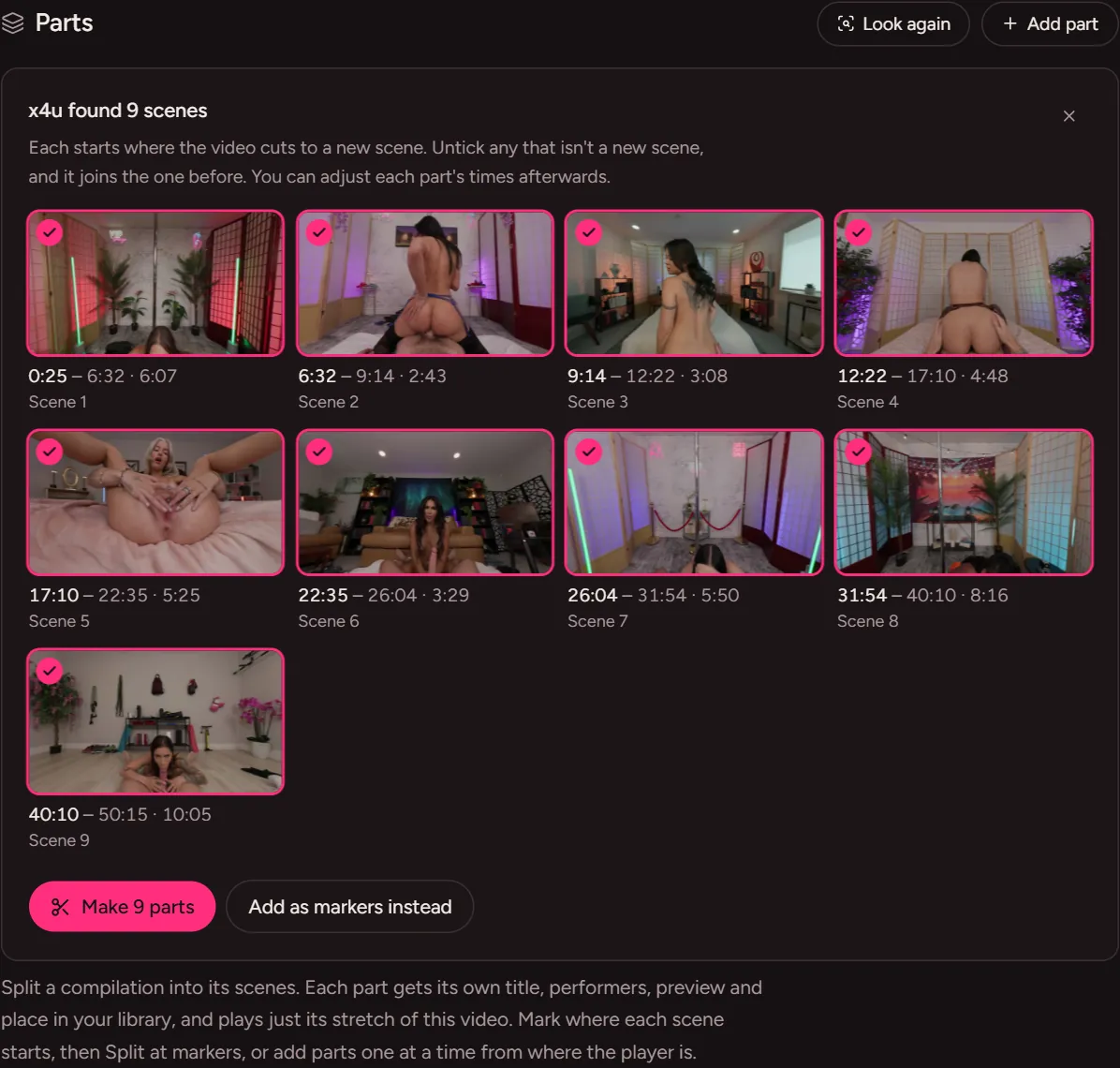
Step by step
- Open the compilation's pageAny video in your library, VR or flat.
- Choose Find scenes, under PartsA bar shows how far it's got and roughly how long is left. Leave the page if you like; what it finds is kept until you use it.
- Check what it foundEach scene shows with a picture of its start and its times. Untick any that isn't really a new scene.
- Make them partsOr add them as markers first, to move any a few seconds, then choose Split at markers.
- Name themGive each part its performers (the compilation's own are offered first) and a title, or find it on StashDB from its page to fill everything in.
What you get
- Each part is a scene in your Library, search, performers' pages, the Feed and the VR Theatre.
- Its own cover, hover preview and timeline thumbnails, made from its stretch of the video.
- It plays just its stretch, from 0:00 to its end, at full quality, in VR too, and remembers where you left off.
- No extra room on your drive: parts play the original file, which stays as it was, marked with how many parts it has.


Questions
Does it re-encode or cut my videos?
No. x4u never changes your files. A part is a start and an end in the original video; x4u plays that stretch.
What if it misses a scene?
Add it yourself: Add part starts one where the player is. A compilation filmed all in one room, with no cards between its scenes, gives Find scenes nothing to go on; mark where each starts and choose Split at markers.
Does it work for VR compilations?
Yes, 180°, 360° and fisheye, at any size up to 8K. Each part plays in VR from its own start.
See more
Everything x4u does, watching on a Quest, or how to get x4u.